
A desktop app for parametric flat-pack design. Pick a product, turn a few parameters, and watch the parts co-nest live on the board you’re actually going to cut. Runs locally on Windows, macOS, and Linux. Java 21 or later required.
Download Tenon Read the user guide
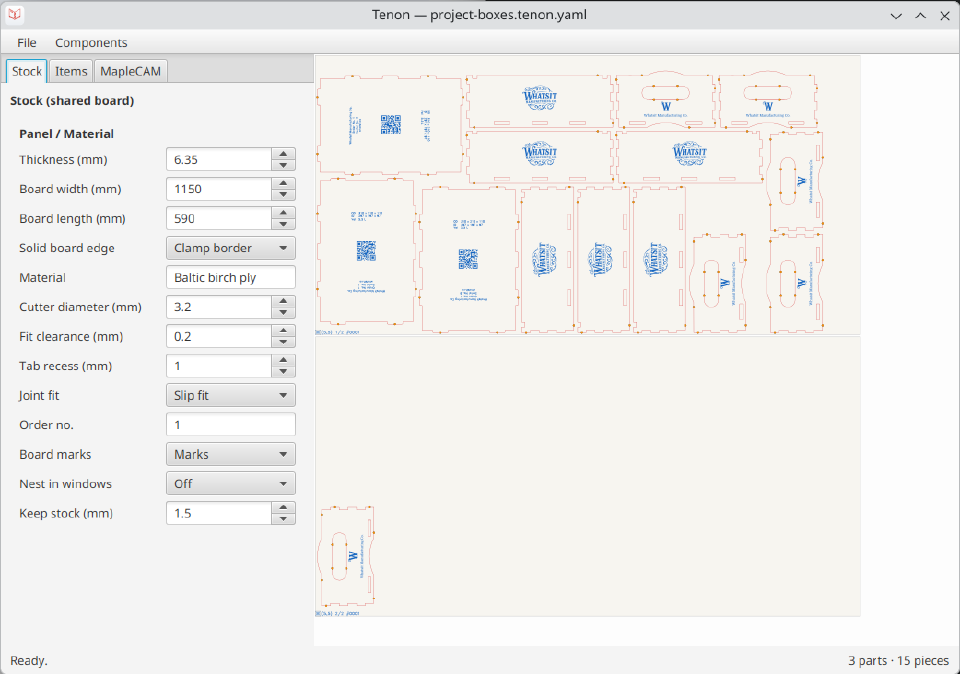
What you can do with it
Design by parameter, not by drawing. Choose a product — pinned box, project box, cabinet, drawer, divider, tray, Skadis panel, gift box — and set its dimensions, material thickness and joint sizing on a form built from the product’s own schema. The parts are generated for you: finger joints, dogbones and kerf compensation included.
One design, one cut list. A design is shared stock (one board, one material, one machine) plus a list of line items, each a product at its own parameters and quantity. Everything on the list co-nests on the same board, so the layout you see is the sheet you’ll cut — including whether the job actually fits and how many pieces didn’t place.
Live preview. Every parameter change recomputes the parts and re-nests the sheet immediately, cut and engrave layers separated. There’s no generate-and-wait step.
Save, export, and cut. Designs save as *.tenon.yaml — readable,
diffable, and re-openable. Export produces a CAM-ready bundle: per-panel
cut and engrave SVGs plus a setup sheet. Hand-off to
MapleCAM is a direct app-to-app send, so the parts land on
stock ready for toolpaths.
Scriptable like MapleCAM. Tenon is a thin client of its own local
HTTP server, so the same design session an AI agent or a curl script
drives is the one on your screen.
Status
Alpha, and downloadable: 0.1.0 is the first public release. The parameter form, live co-nesting, YAML save/open, the CAM-ready export and the direct send to MapleCAM all work today.
Read the user guide for the whole workflow — it ships inside the app as well. Bug reports and feature requests go through support.