Skip to content

MapleCAM

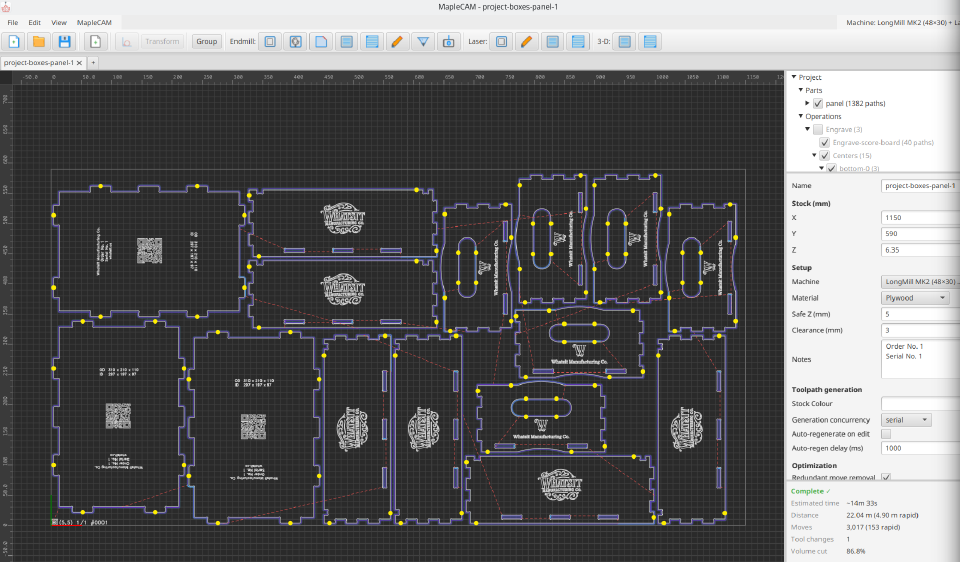
A desktop CAM application for CNC routers and laser cutters. Mills aren’t the target — toolpath generation will run, but mill-specific features aren’t built in. Runs locally on Windows, macOS, and Linux. Java 21 or later required.


What you can do with it

Import SVG and DXF directly. Drop a file on the canvas and the geometry lands on the stock at full size; rulers help you reposition and scale it from there. (No rotation in-app — rotate in your design tool before importing.)

Lay out routing operations: pocket clearing with offset, line, or zigzag strategies; profile contours with tabs for workholding; helical-entry contours; facing for surfacing stock flat; engraving for line work; V-carving with medial-axis depth resolution; and edge chamfering with a V-bit.

Lay out laser operations: contour cutting, line engraving, hatch fills, and grayscale image engraving via raster, halftone, or stippling. Power and feed-rate are per-tool; one project can drive both a router and a laser if both are configured.

Validate before you cut. A voxel-based simulator runs every toolpath against the stock model at 0.2 mm resolution and flags overcut — material removed outside the intended region. The 3D viewport has toggleable layers for toolpaths, rapids, stock, cutting volumes, and remaining material so you can spot undercut visually before exporting G-code.

Export G-code for GRBL, grblHAL, or LinuxCNC. Project files are saved as .mcam (SQLite). Tool and machine libraries persist under ~/.maplecam/ and are reused across projects. A first-run machine setup wizard captures your work area, spindle range, laser capability, and safe-Z heights.


Status

Alpha. Read the user guide for the full workflow and the operation reference. Bug reports and feature requests go through support.